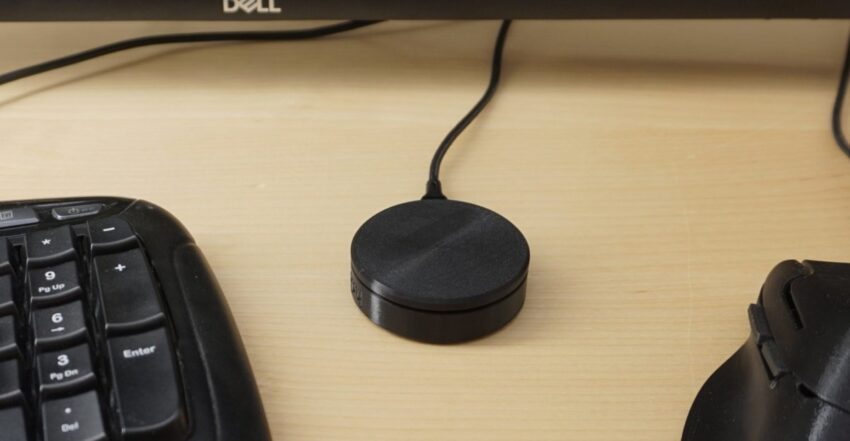
Появился Ploopy Knob — уникальный open-source девайс с поворотной ручкой для управления ПК. Крути громкость, листай документы или редактируй видео жестами! Собери сам или купи готовый. Что дальше — диджейские пульты из коробки из-под пиццы? 😅 #железо #гаджеты
- News
- The Ploopy Knob is an open-source control dial for your PC
- You can use it to adjust volume, smoothly scroll documents and web pages, or quickly search through videos.
- You can use it to adjust volume, smoothly scroll documents and web pages, or quickly search through videos.
- by
- Andrew Liszewski
- Jul 4, 2025, 2:24 PM UTC
- Link
- Threads
- The Ploopy Knob controller can double as a desktop fidget toy.
- Image: Ploopy
- Andrew Liszewski
- is a senior reporter who’s been covering and reviewing the latest gadgets and tech since 2006, but has loved all things electronic since he was a kid.
- Ploopy has announced another desktop accessory called the
- Ploopy Knob
- that can function like a control dial for adjusting volume, scrolling documents, or scrubbing through media on a computer. The Canadian company isn’t exactly a household name like Logitech, but Ploopy’s open-source peripherals offer a lot of customizability, and like its mouse and trackballs, you can customize the look of the Knob by 3D-printing your own hardware.
- The Ploopy Knob is
- available now through the company’s website
- for $49.99 CAD (around $37). Unlike many of the company’s other products, which can be purchased as cheaper DIY kits you build yourself, the Knob is only available as a fully assembled product with software preinstalled that works right out of the box. However, since it’s open-source, you can download all the design files and software on
- Ploopy’s GitHub page
- if you want to source the parts and build your own from scratch.
- If you don’t like the design, size, or even texture of the Ploopy Knob, you can 3D print your own replacement parts.
- Image: Ploopy
- Powered by a Raspberry Pi RP2040 microcontroller, the Ploopy Knob uses a position sensor with a 12-bit resolution and a polling rate of over 1kHz to track its rotational movements. The company says the Knob supports high-resolution pixel-by-pixel scrolling on Windows and Linux, but warns that the experience may not be as smooth on Apple computers. “macOS does smoothing for input devices automatically. This interferes with the code that runs on the Knob, meaning that pixel-by-pixel high-resolution scrolling doesn’t work on macOS. It still functions as a scrolling device, but the scrolling is in discrete steps.”
- As with the company’s other peripherals, the Ploopy Knob uses the
- open-source QMK firmware
- , which runs entirely on the device so you don’t need to install additional software on your computer.
- See More
- Gadgets News Tech Most Popular Most Popular How Nintendo locked down the Switch 2’s USB-C port and broke third-party docking A guide to the best sci-fi streaming this summer Meet Soham Parekh, the engineer burning through tech by working at three to four startups simultaneously We confirmed Nintendo’s Switch 2 TV dock supports VRR — so why doesn’t it work with Switch 2? Samsung seems to have leaked its own trifold phone design Installer A weekly newsletter by David Pierce designed to tell you everything you need to download, watch, read, listen to, and explore that fits in The Verge’s universe. Email (required) Sign Up By submitting your email, you agree to our Terms and Privacy Notice . This site is protected by reCAPTCHA and the Google Privacy Policy and Terms of Service apply. Advertiser Content From This is the title for the native ad
